Monday, July 18, 2011

How to introduce code highlighting into sharepoint wiki articles

Check new series of the articles. Review and user experience on test management systems. Functionality and usability.
-------------------

Thats pretty much simple actually. To support highlighting I use SyntaxHighlighter and SharepointDesigner. The goal is to attach the styles and and the jscript to the heading page and finally to execute the highligher code once the page is uploaded. All of the described relates to sharepoint 2007 (free to downlod from Microsoft site). That is also applicable to the version '10 - the only difference is the master page's file name to process.

So here is the set of simple steps to apply the syntaxhighlighter to the master page of your sharepoint site so that all other pages will take that changes as well

0. Download SyntaxHighlighter files to your workstation so that you can to upload them ato your site in future.
1. Start Sharepoint designer and connect to your site. You should now work with Folder List pane.
2. Create folder to keep your SytaxHighlighter files (ex.: __codeHighlighter)
3. Create subfolders for javaScript files and CSS files (actually I keep CSS right under __codeHighlighter but js files under the separate folder __codeHighlighter/js)
4. Upload shCore.css and shThemeDefault.css to __codeHighlighter folder
5. shCore.js and the set of brush files (shBrush*.js) to __codeHighlighter.js
6. Find the master page file. For SP'07 try to find it under _catalogs/masterpage. You should see default.master file there.
7. Copy and paste that file to the same folder. It will get the name like default_copy(1).master.
8. Open that file. Now we should introduce some changes into the source code of the master page (middle area of the web page editor)
9. Paste the following code right before </HEAD> tag somewhere at the very top of the page (you should only specify the brush files you do use).

<script type="text/javascript" src="pathToYourSite/__codeHighlighter/js/shCore.js"></script>
 <script type="text/javascript" src="pathToYourSite/__codeHighlighter/js/shBrushJava.js"></script>
 <script type="text/javascript" src="pathToYourSite/__codeHighlighter/js/shBrushCpp.js"></script>
 <script type="text/javascript" src="pathToYourSite/__codeHighlighter/js/shBrushCss.js"></script>
 <script type="text/javascript" src="pathToYourSite/__codeHighlighter/js/shBrushDiff.js"></script>
 <script type="text/javascript" src="pathToYourSite/__codeHighlighter/js/shBrushGroovy.js"></script>
 <script type="text/javascript" src="pathToYourSite/__codeHighlighter/js/shBrushJScript.js"></script>
 <script type="text/javascript" src="pathToYourSite/__codeHighlighter/js/shBrushPlain.js"></script>
 <script type="text/javascript" src="pathToYourSite/__codeHighlighter/js/shBrushRuby.js"></script>
 <script type="text/javascript" src="pathToYourSite/__codeHighlighter/js/shBrushSql.js"></script>
 <script type="text/javascript" src="pathToYourSite/__codeHighlighter/js/shBrushXml.js"></script>
 <script type="text/javascript" src="pathToYourSite/__codeHighlighter/js/shBrushBatch.js"></script>
 <link href="pathToYourSite/__codeHighlighter/shCore.css" rel="stylesheet" type="text/css"></link>
 <link href="pathToYourSite/__codeHighlighter/shThemeDefault.css" rel="stylesheet" type="text/css"></link>

10. Paste the following code right before </HTML> tag (at the very bottom of the page)
<script language="javascript">   
        SyntaxHighlighter.all();   
 </script> 

11. Save the changes.
12. Right click on that you new master page file and choose Set as Default Master Page.

You are now ready to highlight the code. Create any wiki page. In the reach editor switch to the source view. Add the code according to SyntaxHighlighter examples.
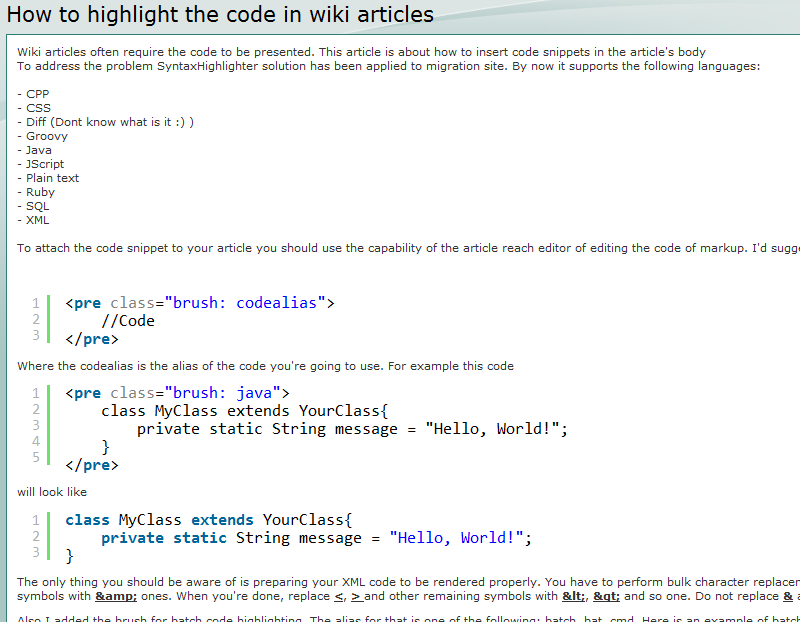


You're done

Friday, July 08, 2011

Custom way to look-up ajax elements in Selenium. Pattern.

Hi!

Looking through a lot of forums I noticed that some people face problems when use native selenium instructions to wait for element appearance on the page. That become pretty big problem when we're talking about dynamic HTML content. In my practice I met the close problems and the way I resolved them is the following pattern. This class controls the look-up procedures on the page. I designed to be capable to configure the duration and number of repeat lookups depending on the channel bandwidth and other factors. Also it has the method allowing us to wait while the required element disappears. That is pretty much common situation in web testing as well. So the class looks like this:


UPD: Here is the sophisticated and of-good-practice way of how to to that in Selenium 2.


package ar.example;

import java.util.HashMap;
import java.util.Properties;

import com.thoughtworks.selenium.DefaultSelenium;
import com.thoughtworks.selenium.Selenium;
import com.thoughtworks.selenium.SeleniumException;

public class SeleniumAdapter {
 
 private final int AWAITING_UNIT_LENGTH_MS = 300;
 private final long AWAITING_THRESHOLD_MS = 10000;
 private Selenium driver;
 

    public static String getRelativePath(String testedDomain, String alteredPath){
   return testedDomain + alteredPath;
 }
 
 public SeleniumAdapter(Properties properties) {
  driver = new DefaultSelenium(properties.getProperty("host"),  Integer.parseInt(properties.getProperty("port")), properties.getProperty("browser"), properties.getProperty("domain"));
  driver.start();
  driver.open(properties.getProperty("domain"));
  driver.setSpeed("500");
 }
 
 public void closeDriver(){
  driver.stop();
 }
  
 public boolean ifXPathExists(String xpathExpression){
  try {
   lookupXPathExists(xpathExpression);
  } catch (AutomationException e) {
   return false;
  }
  return true;
 }
  
 private WebElementEmulator repeatableLookupExists(String xpath) {
  long start = System.currentTimeMillis();
  while (true) {
   try{
    if(driver.isVisible("xpath=" + xpath)){
     TTestCase.logger.debug(testCase.wrapMessage("Found xPath [" + xpath + "]. Creating object.."));
     return new WebElementEmulator(xpath, driver);
    }
   }catch(SeleniumException se){
    try {
     Thread.sleep(AWAITING_UNIT_LENGTH_MS);
     TTestCase.logger.debug(testCase.wrapMessage("Searching xPath [" + xpath + "]. Retry.."));
    } catch (InterruptedException e) {
     e.printStackTrace();
    }
   }
   if (System.currentTimeMillis()-start > AWAITING_THRESHOLD_MS){
    break;
   }
  }
  Statistics.totalLatency += System.currentTimeMillis() - start;
  return null;
 }

 private boolean repeatableLookupDoesNotExist(String xpath) {
  long start = System.currentTimeMillis();
  while (true) {
   boolean isPresent = driver.isElementPresent("xpath="+xpath);
   if (!isPresent) {
    Statistics.totalLatency += System.currentTimeMillis() - start;
    TTestCase.logger.debug(testCase.wrapMessage("Not found xPath [" + xpath + "]. Success.."));
    return true;
   }
   else{
    if(!driver.isVisible("xpath="+xpath)){
     TTestCase.logger.debug(testCase.wrapMessage("Found xPath [" + xpath + "]. However it is not visible. Success.."));
     return true;
    }
    try {
     Thread.sleep(AWAITING_UNIT_LENGTH_MS);
     TTestCase.logger.debug(testCase.wrapMessage("XPath [" + xpath + "] still can be found. Retry.."));
     if (System.currentTimeMillis()-start > AWAITING_THRESHOLD_MS){
      break;
     }
    } catch (InterruptedException e) {
     e.printStackTrace();
    }
   }
  }
  Statistics.totalLatency += System.currentTimeMillis() - start;
  return false;
 }

 public WebElementEmulator lookupXPathExists(String xpath) throws AutomationException{
  WebElementEmulator handledElement = repeatableLookupExists(xpath);
  if (handledElement!=null) {
   if (handledElement.getQuantity()>1){
    throw new AutomationException("Several elements can be located using specified xpath [" 
      + xpath + "] You should concretize.");
   }
   return handledElement;
  } else {
   throw new AutomationException("Lookup for element ["
     + xpath + "]" + " failed after "
     + AWAITING_THRESHOLD_MS + " ms awaiting.");
   
  }
 }
 
 public boolean lookupXPathDoesNotExist(String xpath) throws AutomationException {
  if (repeatableLookupDoesNotExist(xpath)) {
   return true;
  }else{
   throw new AutomationException("The xpath ["+xpath+"] is still observed after "+AWAITING_THRESHOLD_MS + " ms awaiting.");
  }
 }
}

That's pretty much it.

Tuesday, July 05, 2011

How to get instant updates of configuration file of your testing framework from svn repository

Hi.

Here is one more pattern intended for operating with the latest versions of configuration files. That was originated from the following. The project under testing behaves pretty much agile so to hold such agile things up to date we want to extract the relevant configs from some centralized storage that is easy to maintain.
To support such functionality I prepared small utility class to communicate with svn repository. The pattern looks like this:

P.S. - you should use svnkit in order to keep the code working.

package test.svn.client;

import java.io.File;

import org.tmatesoft.svn.core.SVNDepth;
import org.tmatesoft.svn.core.SVNException;
import org.tmatesoft.svn.core.SVNURL;
import org.tmatesoft.svn.core.auth.ISVNAuthenticationManager;
import org.tmatesoft.svn.core.internal.io.dav.DAVRepositoryFactory;
import org.tmatesoft.svn.core.internal.io.svn.SVNRepositoryFactoryImpl;
import org.tmatesoft.svn.core.io.SVNRepository;
import org.tmatesoft.svn.core.wc.SVNClientManager;
import org.tmatesoft.svn.core.wc.SVNRevision;
import org.tmatesoft.svn.core.wc.SVNUpdateClient;
import org.tmatesoft.svn.core.wc.SVNWCUtil;

public class Communicator {
 
 static final String syncDest = "/Storage";
 
 SVNUpdateClient uc;
 SVNURL repositoryURL;
 
 public Communicator(String user, String password, String repository) throws SVNException{
  repositoryURL = SVNURL.parseURIEncoded(repository);
  DAVRepositoryFactory.setup();
  SVNRepository svnRepository = SVNRepositoryFactoryImpl.create(repositoryURL);
  ISVNAuthenticationManager manager = SVNWCUtil.createDefaultAuthenticationManager(user, password);
  svnRepository.setAuthenticationManager(manager);
  SVNClientManager cm = SVNClientManager.newInstance();
  cm.setAuthenticationManager(manager);
  uc = cm.getUpdateClient();
 }
 
 public void syncUp(String segment) throws SVNException{
  uc.doCheckout(repositoryURL.appendPath(segment, true), new File(syncDest), SVNRevision.UNDEFINED, SVNRevision.HEAD, SVNDepth.INFINITY, true);
  System.out.println("Done");
 }
 
 public String getResourceFolder(){
  return syncDest;
 }
 
 /**
  * Just to check how it really works :)
  * @param arg
  * @throws SVNException
  */
 public static void main(String[] arg) throws SVNException{
  Communicator driver = new Communicator("secret", "secret", "https://my.svnserver.fake/trunk");
  driver.syncUp("/resources/config");
 }
}

Then we should write the support for fetching the certain values from the resource files

package com.somefake.pkg;

import java.io.FileInputStream;
import java.io.FileNotFoundException;
import java.io.IOException;
import java.util.HashMap;
import java.util.HashSet;
import java.util.InvalidPropertiesFormatException;
import java.util.Properties;

import com.somefake.pkg.TAE;

public class ResourceProvider {
 
 private static final Communicator resourceActualyzer = new Communicator("testuser", "testpassword", "https://fakesvnserver.com/trunk");
 
 private static Locale currentLocale = Locale.RU;
 
 private static final HashMap<Locale, Properties> map = new HashMap<Locale, Properties>();
 
 
 static{
  TipsteryTestCase.logger.info("Initializing SVN client...");
  try {
   HashSet<String> localeRu = new HashSet<String>();
   HashSet<String> localeEn = new HashSet<String>();
   localeRu.add(resourceActualyzer.getResourceFolder() + "/Resources_ru.xml");
   localeRu.add(resourceActualyzer.getResourceFolder() + "/jsResources_ru.xml");
   localeEn.add(resourceActualyzer.getResourceFolder() + "/Resources.xml");
   localeEn.add(resourceActualyzer.getResourceFolder() + "/jsResources.xml");
   resourceActualyzer.syncUp("/resources");
   map.put(Locale.RU, loadProperties(localeRu));
   map.put(Locale.EN, loadProperties(localeEn));
  } catch (Exception e) {
   resourceActualyzer.setSuccessful(false, e);
   TipsteryTestCase.logger.error("Error while loading resources.", e);
  }
 }
 
 private static Properties loadProperties(HashSet<String> sourceFiles) throws InvalidPropertiesFormatException, FileNotFoundException, IOException{
  Properties stagingProperties = new Properties();
  for(String sourceFile: sourceFiles){
   stagingProperties.loadFromXML(new FileInputStream(sourceFile));
  }
  return stagingProperties;
 }
 
 public static String getProperty(String key) throws TAE{
  if(!resourceActualyzer.isSuccessful()){
   String message = "Looks like you had problems with " 
     + "resource files syncronization\n"
     + "Check if you set valid credentials and specified valid resource file names";
   TipsteryTestCase.error(message);
   resourceActualyzer.getException().printStackTrace();
   throw new TAE(message);
  }
  return map.get(currentLocale).getProperty(key);
 }
 
 public static void setLocale(Locale newLocale){
  currentLocale = newLocale;
 }
 
 /**
  * Just to check if it works
  * @param arg
  * @throws TAE 
  */
 public static void main(String[] arg) throws TAE{
  System.out.println(ResourceProvider.getProperty("some.property"));
  ResourceProvider.setLocale(Locale.EN);
  System.out.println(ResourceProvider.getProperty("some.property"));
 }
}

Locale here means just the enum, and do not curse me for the approach to the errors handling.