Showing posts with label QA. Show all posts

Friday, June 14, 2013

SquashTM (Squash TM) 1.5.0 test management system review

Introduction

Let's  continue exploring test case management systems. This time I chose the one called SquashTM (Squash Test Management or Squash TM) - open-source pretty looking and of broad functional scope tool from French team. Unlike some other products SquashTM offers full scope of functions on free-of-charge basis which definitely gives some extra points to the system.
You also might want to visit my previous review of Zephyr Desktop TCMS. In such the case please follow this link.

Web-site

One of the weakest components of the product is the web-site. The face of a product intended to raise the popularity has the big problem with localization. Shame on me, but I really don't speak French and I guess the most part of the world doesn't. Coming to the site of a product pretending to be the world-wide famous one in some observable future I expect to see convenient English version. I believe that will help to develop and to distribute the product much faster than now.
Well.. Anyway I tried to use google translate and that helped me to manage to download the binary distribution. By the moment the latest available (and stable) version is marked as 1.5.0. The supported operating systems are:
  • Windows
  • Mac OS
  • Linux
The site has a Wiki part. The wiki made me completely confused. Fortunately it is written in English but the table of content has the topics ordered alphabetically. Thus the installation guide can be found somewhere in the middle of the topic list, however the most convenient place I guess is somewhere at the top.

Installation

SquashTM (or Squash TM) is distributed as jar installer (for Windows OS at least). Despite I chose English version the installation wizard still supplied the dialog controls with the captions like "Suivant" and "Quitter". Fortunately the control icons didn't give me the chance to go the wrong way. Just click the button with big green forward-arrow every time and you will succeed.
SquashTM (or Squash TM) fits people who would like to play with the system before take the positive or negative decision and at the same time wouldn't like to spend much time for setting application up as it comes with default H2 database. So you can use it right after the installer finish working. 
Looks like there is no way to migrate the data from the default database to your custom one (MysSQL is supported). There is direct warning in the Wiki at least saying literally the following

 Caution : by switching to a MySQL database, all data previously entered in the on-board database will be lost.

You can also install the system as Windows service so you don't have to care of starting the application each time your server gets rebooted.
SquashTM (or Squash TM) distribution binds to 8080 port by default so don't forget to change it once you've got a lot of web services running at your server. But please be aware of the official instructions which acn e found on this page are not correct. In my case I had to change environment variable HTTP_PORT as well to make my instance working on non-default one.

Features

SquashTM (or Squash TM) offers the standard set of features (see official terms description here)
  • Integrating with SquashTA (the review is coming)
  • Managing the isolated projects
  • Managing Requirements (with customizable fields and versioning)
  • Managing test-cases (with customizable fields)
  • Managing campaigns (with customizable fields)
  • Test steps support fields customization
  • Iterations support field customization
  • Integration with mantis bug-tracking system
  • Managing the users and the teams. Each user should be assigned with the predefined permission set called "Profile". See the details here.
  • Reporting

Usability

 General controls

In general the application UI looks quite attractively. The layout consists of three vertical column. The leftmost one and the most narrow at the same time holds workspaces controls. Using it you can switch between requirements, test-cases, campaign and report workspaces. Once you choose one you see two other columns. 
The middle column holds the tree of entities which are currently under management according to workspace selected. You may add, edit or remove entity, arrange them by the folders and perform searching there.
The leftmost and the biggest column contains the particular entity's details. Another thing I like in the application is that once you edit anything you're provided with rich editor and able to format the text with the broad scope of formatting controls

Requirements and Test-cases

The approach of binding requirements and test-cases that is used in SquashTM (or Squash TM) doesn't look very comfortable to me. It is supposed that you create set of the requirements and set of the test-cases which are not related to each other originally. Those sets might be of a huge number of items. Then you may do one of the following
  • either go through each requirement and bind it (every one) to one ore more test-cases
  • or go through each test-case and bind it to one ore more requirements
This seems not introducing big problems until you have big project with a lot of requirements and a lot of test cases and very complex requirement hierarchy.
The much more convenient way would be creating the test-cases straight from the requirement which is not possible in the current version. Thus having the requirement created (not necessarily by the current user - probably by another one) the dedicated tester could cover it with the set of appropriate test-cases and, say, mark it somehow as covered.

Composing test-cases

Unlike the requirements the test-cases are not just the free-text but some complex entity. Each test-case has some general information containing:
  • Name
  • Description
  • Weight: Very High, High, Medium, Low
  • Nature: Undefined, Functional, Business, User, Non Functional, Performance, Security, ATDD (No idea about what it could mean :) )
  • Type: Undefined, Compliance, Correction, Evolution, Regression, End-to-End, Partner
  • Status: Work in progress, Under review, Approved, Obsolete, To be updated (not sure if there is some BPM engine embedded to drive these states automatically)

This is how the general view of the test-case looks like:

SquashTM test cases

All the properties above have nothing to do with the most valuable part of any test-cases - test steps. The steps should be populated at the dedicated "Script" tab. Each step consists of the list of the actions and the expected result. 
You also can assign the particular step to one of the test-case requirements so that it implies that step verifies one. However I couldn't manage to make it work. First strange thing is that when you're managing the requirement set verified by the particular step you're requested to remove unnecessary ones from the entire list of the test-case requirements. IMHO the more obvious way is to mark ones I'd like to include into the step coverage. Anyway.. the second strange thing is that the requirement gets selected if only to click the cell with requirement number (1,2,3...). I would expect the entry is selected wherever I click in the row... The last but the main problem is that despite I choose the requirement and click "Remove from step" button it still remains in the list and not removed.

Here is the step management view:

SquashTM test cases

In addition you can attach files to the test-case or to the particular step of the script. Here I experienced the problem as well as the application rejected my attempt to attach png file to the test-case as the one of not supported formats.

 Campaigns

The test-execution mechanism is supported with campaign concept. The manager can create a campaign - the aggregation for the set of test-cases. Each test-case can be assigned to some user. The campaign should be broken down by the iteration - the particular test run. The iteration may contain the subset of the entire campaign test-case set. If the test-case appears in several iterations of a campaign and gets the certain status in one of the iterations then it has the same status in other ones. This should look like this:

SquashTM campaigns

Once the tester which is assigned with the tests sees the iteration ready in their campaign workspace they may start it like it is shown on the screen-shot:

SquashTM test execution

Clicking "Begin" button takes the user to the steps of the test-case until the steps are over. Once they are the user moves to the next test-case of the iteration automatically until there are no more test-cases in the scope.

Reporting

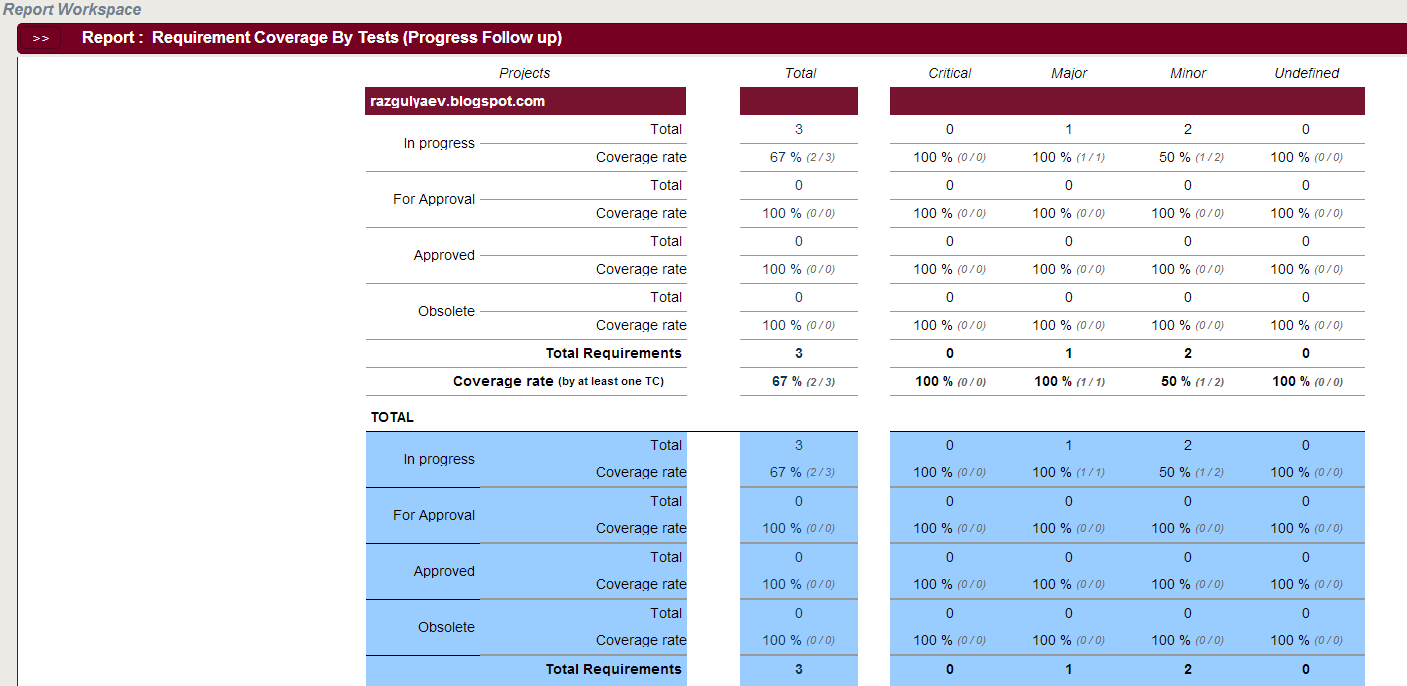
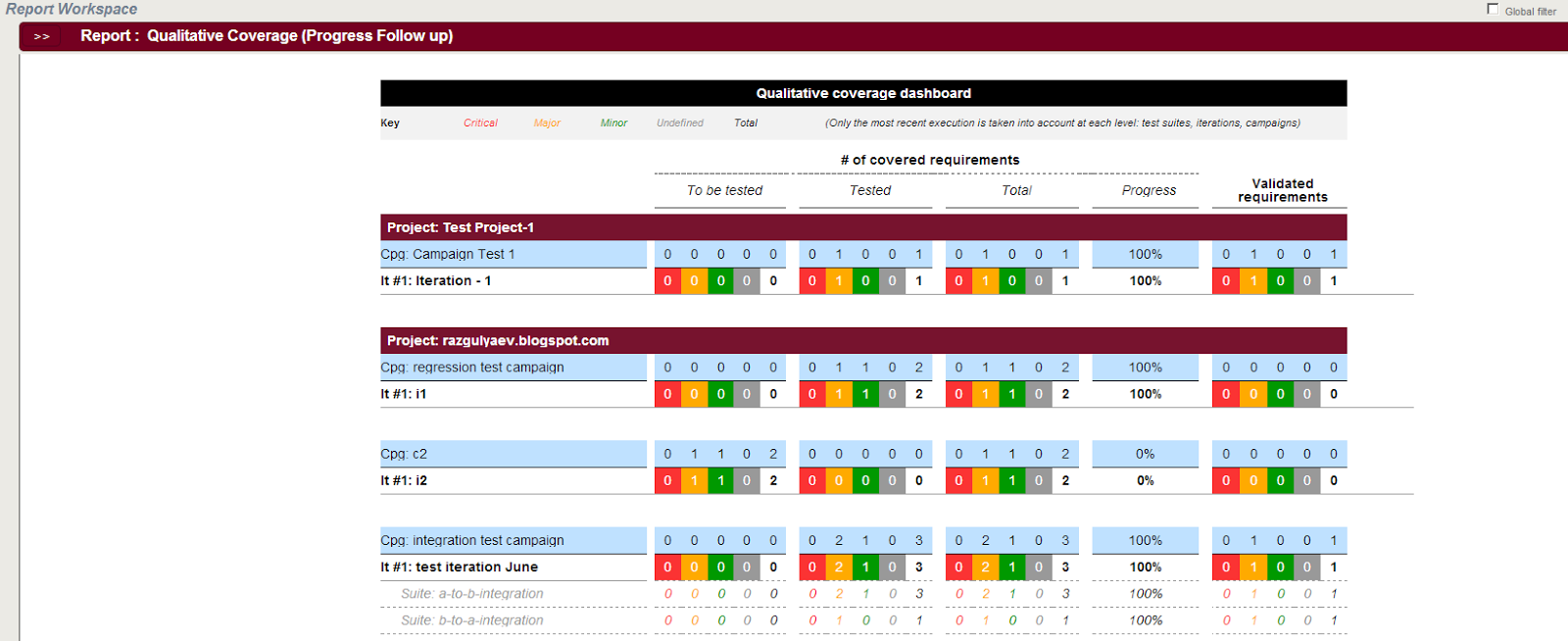
Reporting capabilities of the application leaves ambiguous impression. Officially the tool has quite functional reporting. You may generate the report to analyze your requirements and test cases regardless whether you performed any test execution or not. Each report you may export to PDF format to present the results to your management for example.
Its also possible to generate the report for certain executions (aka campaigns). That's all great however I met the problems again. When I tried to filter the report data by my test project only, the filter couldn't ender the project set in the filter dialog so I had to be content with the all the existing projects in my report.

Here are several examples of the reports I managed to generate:

SquashTM test reports

SquashTM test reports

SquashTM test reports

Conclusion

I'm confused and it is quite hard to give the resolution on the tool. From the one hand from functional and usability standpoints it is the best free test-case management systems I worked with. From another hand it is still quite raw and buggy. Here are some problems I found which I couldn't assign to the topics above and which are mostly related to the user management functionality:
  • Whatever profile I assigned to a user I always saw Advanced Tester one when I came back to the corresponding dialog. However when I log in as that user I see the actually assigned profile for them
  • When I compose the team I see the users I recently deleted and able to get to their details by drilling from the team configuration dialog
  • Annoying problem is that the trees in the workspaces are not always updated in time when you add some sub-entities there
Well. I think despite there are a lot of quite annoying problems in the product they are all eliminated with the fact this tool is freeware and provides good functional scope and nice usability. Yet it fits small and middle-size development teams but the suject has all the chances to become domain standard in the observable future. So I give this TCMS 8.5 points of totally 10. I would give more, but those annoying bugs...

Tuesday, March 05, 2013

Zephyr Desktop test management system review

Introduction

This post originates the series of reviews of test-case management systems. All the tools are available for free (some with restricted functionality). The first one is Zephyr Desktop. This tool asserts supporting set of common TCMS use-cases such as manage requirements, test-cases and executions. It also features some stuff that allows to integrate your TCMS system with test-case automation solution.
See also SquashTM test case management system review.

Web-site

Nice web-site. It is easy to navigate and to find required distribution. However it does not differ much from the competitors. Free version is available after few of registration steps here.

Installation

Zephyr Desktop Community Edition is supplied with built-in MySQL server and Apache Tomcat 5.5 servlet container. The installation process is straightforward and should not make a problem for anyone. After you've installed the system you get two new services running: Zephyr server and MySQL server with operational database. Of course you have to ensure all the ports you're going to use are not already used by some other processes.

Features

The free version I've tried offers a set of common-qa-practice use cases. However it limits the number of available project by one. This is not so bad as you're free to work-around such the problem by considering the release term as product-release term (later I'm explaining what all this stuff means). So, the application allows to:
  • Manage the resources (add, remove or edit users)
  • Specify requirements, structure them and map to the test-cases
  • Break-down test-cases by purpose (like regression, user acceptance, etc)
  • Schedule TC execution
  • Analyze project statistics
  • Integrate with bug-tracking system (not touched)
  • Execute external processes (not touched)
  • Interact with external tools via API (not touched)

Usability

So, what's the user flow as it is seen for me: Some test manager logs in and configure the project. They scope available resources and releases and probably fills the project with release-specific requirements. The tester covers the requirements with test-cases. They break-down the test-cases by their purpose. The test manager schedules the test execution for particular test-set type (e.g. regression testing). Tester passes the test cases. They set the status for each one so that once the execution done we have the set distinguished by PASSED/FAILED so we have the statistics to be analyzed.

Look&Feel

Graphical framework

UI looks a bit heavy  and is built on Flex technology. It implements dialog model. It works fast but sometimes it looks overdriven so you can get lost in the numerous dialogs like this
zephyr desktop community edition ui layout

That is a good solution for desktop applications as we have a sort of task-bar in windows or linux-GUI along with capability of switching between the windows using short-cuts (aka hot-keys). However the same approach in Web UI doesn't look so organic.
The frameworks allows drag'n'drop items at some places. It is generally used in tree structures to move items from one folder to another. However it does not allow to move folders to subfolders. However such the feature would look quite useful for me.

Releases

As I said before we're not able to manage several projects in free version of Zephyr Desktop. However the tool offers the release management feature which separate the workspace into several isolated areas. This looks like the picture below:
zephyr desktop community edition release tabs
Once you select particular release tab you're able to manage requirements, test cases and other stuff in isolation from other releases. Thus, you can establish the convention saying that release is not actually just a release but PRODUCT-RELEASE. Hence you may manage several projects in one.

Requirements

The tool allows managing the requirements. This is great as (isn't is strange?) not all the TCMSs have requirements as the basic entity in the structure. However the this area has a bit of drawbacks as well. Say, why not to allow the user creating test-cases straight from the requirement? Does that look okay when you have hundreds of requirements and then should create thousands of test-cases and only after all finally bind them to each other? Anyway this way is how all happens in Zephyr.

Test-case management

All the test-cases may exist either being bound to certain requirement or separately. Application offers useful feature called "Repository". The repository allows breaking the test-cases down by the purpose you'd like them to target. You may want to include the test-case in, say, user acceptance set along with regression set. This is what repository will help you to achieve. However I couldn't manage to map the test-case to several repos at once, so I had to clone them to move separated items each to their dedicated repository folder.
Test cases consist of the steps. Each step can be described in comprehensive way including attaching documents as files or specifying URLs for those resources. You also can keep the release-wide documents uploaded so they are visible from everywhere.
zephyr desktop community edition managing test-cases

Another feature that I like is test-case change-history so you can track what changes have been made to the test-case since its creation.
Test cases (as actually most of the entities in the system) are stored in a sort of folder structure so you're free to order your stuff in the way you like. However I would expect I see (or have the option to see) all the items  in selected folder and its sub-folders. Now if you want to observe all the tests you have to bypass all the tree-folders manually.

Scheduling

This function seems to be the only one I couldn't cavil at. It allows scheduling the execution of your tests breaking it down by phases and sub-phases with responsible resources and timing boundary. It should look like this:
zephyr desktop community edition scheduling test execution

Reporting

After you (or your guys) have executed all the tests you've been scheduled for, you may check the statistics of your project. In free version it looks quite poor. It delivers some simple stat of what part of your tests failed and what didn't, which part of requirements is covered with the test-cases, etc. It represents as the release-specific statistics as the project-wide one. All that looks like this:
zephyr desktop community edition statistics

zephyr desktop community edition statistics

zephyr desktop community edition statistics
You may also observe the main dashboard but this has not a lot of sense in free version where you're not able to manage several projects.

Not covered features

As I mentioned before I had no chance to play with a few of features in Zephyr. However when I tried to integrate the tool with JIRA it warned me of I will not be able to change my choice in the future and this decision should be final. Doesnt look pretty flexible for me :)

Conclusion

Anyway despite a set of drawbacks found in the tool I find this TCMs pretty fitting the needs of the ordinary QA team of 5-10 persons which manages not very large test sets (say 300-400 test-cases against 50-100 requirements) and which does not plan to change bug-tracking system :)
This tool will also be found comfortable for the teams which do not spend time for deployment and configuring huge and complex systems and want to start managing the tests as soon as possible.
I give this TCMSs 7.0 points of totally 10.0.

Tuesday, May 15, 2012

Selenium Java client: proper way of how to know that the certain element got disappeared

Im one my previous posts I suggested the way on how to ensure the certain element disappeated in your test scenario code. That usually the case of Web UI testing as it is not only important that something is shown on your click but also that something stopped being shown. Now let me introduce the right way on how to do that :)

So assume you have the following function devoted to looking up the fact the element on the page disappeared. You call it somewhere from your scenario code.

public boolean lookupXPathDoesNotExist(final String xpath) throws CustomAutomationException {
 
try{
 new WebDriverWait(getDriver(), AWAITING_THRESHOLD_MS/1000, 1000).until(
  new ExpectedCondition<Boolean>(){
   @Override
   public Boolean apply(WebDriver d) {
    if (d.findElements(By.xpath(xpath)).isEmpty()){
     return new Boolean(true);
    }else{
     return new Boolean(false);
    }
   }
  }
 );;
}catch(org.openqa.selenium.TimeoutException e){
 throw new CustomAutomationException("Timeout exceeded - however the element is still visible");
}
return true;
}

To make it work you should consider the following:
AWAITING_THRESHOLD_MS - is the constant holding the timeout you'preffer to fail your scenario after in case the element is still on the page
getDriver() - is the function that somehow returns the current acting webdriver
1000 (the last parameter of WebDriverWait method) - the interval between repeated tries

Read also How To Check That Element Is Present In Another Element

Wednesday, September 21, 2011

QA under scrum in long-term project

A lot of software development teams move to scrum not just because the reality requires so.. I mean not because they cannot work effectively under some other methodology. They move just because that's the world trend and because Google does so :)
I've been working under scrum for more than a year and have been watching the successes and the fails and also have been comparing the product quality progress between the classical waterfall we had before and the scrum we're working under now.
So.. the obvious thing is that scrum is pretty much suitable for short-term projects only. That means it is the best methodology if only you should not put a lot of efforts for addressing legacy problems like regression testing and so on. Otherwise you will have to fix bugs instead of delivering product value to the customer.
The second thing I'd like to highlight is the role of QA under scrum. Theoretically scrum team should have cross-functional nature and there should not be test engineers or development engineers but everyone knows that's pretty much hard to form such the team. Especially if you're putting your processes from waterfall to agile rails.
And I was thinking a lot.. About the best way to use QA specialists in scrum. About how to gain the most value from their skills and simultaneously not to move too far away from scrum? And what I what I've come to is here.
The best way to use the skills capabilities of QA guys in scrum is to create a kind of the layer between the iteration outcomes and the customer. Classical scrum supposes delivering the value to the customer at the end of each iteration. Then following the classical approach the team should use the customer feedback to adjust the product if the feedback takes place. I think I will be useful to introduce to types of iteration result demonstrations. First demo should be delivered to QA layer. Once it is done the QA department takes some time to certify the quality of the product. That looks like the classical testing however it may provide the feedback faster and more understandable for the team than the customer usually does.
After the team addresses the feedback of QA layer it may deliver the finalized results to the real customer or stakeholder. In such the way the delivered product will keep less bugs as it passes the QA processes and will not annoy the customer providing the results they do not expect to see. That will be supported by the classical relationships (which work under waterfall) between QA, customer and owner of the requirements.
This is what I'm thinking about. Will it be working or not..