Showing posts with label load testing. Show all posts

Wednesday, August 08, 2012

Performance testing of web application built over long-polling architecture

Check new series of the articles. Review and user experience on test management systems. Functionality and usability.
-------------------

It's not a rocket science how to perform load testing of regular web application. Basically you need to measure the time between you send the request to the server and the time the server responds. Much harder is to test so called long-polling architecture where it becomes not reasonable to measure respond-request time as the respond time depends on actually two points:

1. If the server has anything to say to your client it responds immediately
2. If not, it waits for the threashold and responds breaking the connection which is restored immediately so a kind of persistant channel occurs.

But wait. Does that mean we have no chance to consider the performance metrics to measure? Not actually.

See the model of long polling communication I've prepared for you. The strong horizontal line here means the layer responsible for long-polling communication between the client (uasually your web-browser) and the server.

Performance testing (aka load testing) of long-polling web architecture


(1) Client sends regular request to configure the server to know which information the client wants to recieve from the server.
(2) Client sends the request asking if the server has requested data to publish. This request should be configured to have appropriate awaiting interval (bigger than a Threshold)
(3) Server keeps the request while it has not data to publish. If the data is not ready in Threashold interval the server responds with corresponding message.
(4) Client gets the response and recreates the request (all those client requests compose a kind of persistent data channel).
(5) Once the data is ready the server respondes (6) to all the clients subscribed for it.

So what we need to know is how fast the client gets published data. To find that out we should measure the interval between (5) and (6).

But wait once again. The number of clients subscribed for certain data may be actually pretty big. Should we somehow consider this fact when measure the performance. Yep - we should. When the data is ready the server iterates though a pool of the subscribers and responds the corresponding requests. This means in such the case there will be a client which will get the respond later than others ones. Here we can consider two metrics of our application performance. They are:

1. Time interval between the data gets ready on the server and the fact of getting it by the first client
2. Time interval between the first and the last client gets the data

P.S. - Performance testing of long-polling architecture is not easy stuff. To perform it effectively you sould be absolutely sure you can control the data readiness and synchronize it with client requests.


Monday, August 06, 2012

Web Load Testing: When you can come up with single test user


All the measurements contain certain error. You will never get absolutely accurate value, so the only thing you can do with that is to accept that. 

When you perfrom load testing of your web aplpication it is usually strongly recommended to use different user for each thread and it is quite reasonable. However in some cases you may consider the results reliable even if you use single credential to login for several threads. So how do you know if you can manage with the single test user. First of all you should figure out what you want to measure and what technologies you use.

The generic problem of single credential implies the server performs some data processing once the user requests the server resources the first time and then uses pre-evaluated data not spending the time for other requests. This highly depends on the technologies you use, on whether they support caching or whether they are so called statefull. 

HTTP server is orginally stateless machine. That means that all the "state" matters are supported by injecting so called cookies into the client browser. All the tools for load testing support completely isolated sessions for each thread. That's why some of the functional areas can be loaded with the help of only one user.

The good examples are 
  • loading any static resource such as
    • web pages
    • files
    • other data streams
  • displaying the page with dynamic data not depending on the person looking at it
  • simple chat rooms (surprisingly)
  • authentication/authorization (again surprisingly). Even if your database caches requests you rather load HTTP server on authentication/authorization phase than a db server. So lot of threads will show you the problems (if they are) in your HTTP container configuration despite your db server will be still feeling okay.

All these points do not ensure your success but rather are aimed to make you focus your attention on whether the architecture of your application is suitable for testing with single credentials. Each application is unique so you are still responsible for decision.

Monday, July 23, 2012

Web Load Testing Basics


Looking through a number of forums I noticed that a lot of people are trying to get familiar with JMeter (so that they're capable to load test web servers) without understanding the basics of load-testing of http servers.
All what's told about here is actually the very common and the minimal stuff to know to start load testing with JMeter.

Whats the goal

You may want to load your server due to several purposes (I would point out two of them). Actually one usually puts their own value to the terms, however I would propose to understand them in the following way.

Web load testing with JMeter
  • Load Testing - this is the regular testing implying you just track the reaction of your server for load injection. The main goal of such the tytpe of testing is to learn the dependency of how your resources are consumed against the portion of load. Starting from small loading you make the load rate igger and bigger and meanwhile you check how the correasponding components consume the resources. For example you may set the performance counters for processor time utilization and disk queue for the machine where your database is hosted. By increasing the numner of users trying to log in your system you may learn the tend on how your database responds. So you're able to predict the resource consumption by extrapolating the trend.
  • Stress testing. The main goal of such the type of testing is to check if the system is ready for real load spikes. It implies you inject the unusually huge loading and check mostly whether the system is still alive and no critical data is corrupted.

What makes the resources to be consumed.

So we have http server. What makes it to consume more or less resources and wich component of your system are relevant to your goal? That highly depends on the architecture and what's your server actually doing. Any calculation usually consumes a lot of CPU time, working with data loads hard drive and RAM. So for newbies I would reccomend to set sch three counters for each node where you host your system's components. Likely they are at least: HTTP server, DB server (+ probably authorization server)

Should I completely emulate user's flow?

Some start using JMeter from the simplest stuff like recording user interaction with JMeter proxy component. They usually get some tresh-looking stuff as proxy records the requests to every resource (however you can configure it to capture only the requests which meet certain patterns ). So whether we should keep all those requsts in load scenario? Whether they are relevant to the goals we set for our testing? Not indead.

Lets first recall the http conception. Http is the protocol which is originally intended to provide hypertext (actually just the formatted text) to the clients (aka browsers). Now the http server can also provide not only the hypertext but also media, some archived data, etc. All that can be described with umbrella-term "resource". So once you request html page you do rather request resource. Each resource on the server has its own URL (Uniform Resource Locator). That URL is basically the unique identifier that says to the server where it should take the resource from.

Server gets the URL requested by the client and then decides how to process it. Depending on the web container you're using the server redirects the request to dedicated process which returns the resource. So here the magic starts.

Actually the requested resource can either exist or even not. For example you may have static html page on the server. If you request that page the server usually just returns it to you (probably after your request authorization). Such the request type does not require lot of CPU time. It requre the disk time and probably some system specific resources (like free file descriptor). The most interseting things happen if some data you're requesting require pre-evaluation.

Assume you have dynamic content on your page. Before the server returns you the page it has to parse your html, evaluate the dynamic parts (probaly it will require sql query execution). This is what matters for the load testing.

Curse on record/playback aproach

How the testers usually act to build the scenario. Testers usually somehow capture the real requests. They interact with the server using the web UI and either capture the scenario using JMeter proxy or capture the requests using browser-embedded tools. Such the approach has certain negative sides:

  1. You capture a lot of not required requests
  2. It is hard to understand the logic of such the scenario after it's been built
  3. In real life lot of the requests  are supplied with parameters which are evaluated in different ways for particular session so they'll be obsolete in new one.

What pattern should I use to reproduce the user interaction?

Follow the below rules until you're not skilled enough

  1. Find out if any resources are stored in third-party storages. Requesting such the resources should not be included in your scenario as we cannot impact the third-party components' performance
  2. Avoid requesting static resources if you're not doing stress testing
    1. Find out if any files are generated on the fly. Such the files should be requested by your scenario as they consume processor time on generation phase. All other files shouldn't.
    2. Tend to avoid requesting completely static html resources. They won't give you a picture of your server performance
    3. Tend to avoid requesting javascript files. JMeter does not process javascript anyway and won't make your scenario easier
  3. Avoid proxies. Proxy will make you confused with your scenario as it will not be easy at all to read recorded samplers. If you don't use proxy it takes a bit more time to build your scenario but you can use the power of flow control components and parse the samplers output to provide the correct parameters which are specific for particular session.

The next time I'll touch the specific of error identification in your scenario.

Read also some advanced stuff about the approach to perform load testing of comet long-polling applications (which is called by some people AJAX push).

Thursday, July 19, 2012

How to make JMeter to execute certain sampler in certain thread

One day I needed to develop JMeter scenario so that it could execute certain samplers in certain threads and choose the order of sequential sampler execution according to certain algorithm. Random Controller was not an option as it actually does not guarantee that the next thread will run another sampler.

Searching the solution led me to JMeter component reference page where they say that  such the cases should be handled with so called Interleave Controller. However due to some reasone that silution didn't work for me. Probaly I couldn apply that emoponent properly, anyway I used another approach.

1. Add a counter to your thread group so that it will store the numbr of sequential running thread in dedicated property (ex. cntr)
2. Group the set of samplers you'd like to choose from with Switch Controller
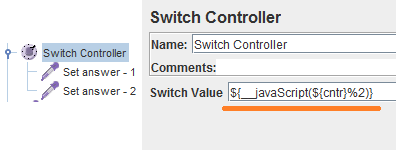
3. Using javaScript expression specify the condition for "Switch Value" field like it is shown on the picture below
Example of Switch controller and javascript mod (%) operator
This approach actually means that each time the new thread gets started the sequential number is generated by the conter. That value is stored in cntr property. Then the execution flow gets into Switch Controller. It evaluates the number of the item to be executed this time. Evealuation is performed with the help of javascript mod operator. Thus in above example we have two alternatives to choose from so we must get the reminder after devision current thread number by two. If we have N alternatives to choose from we must specify the following   condition:

${__javaScript(${cntr}%N)}

That's it