Showing posts with label performance. Show all posts

Thursday, July 19, 2012

How to make JMeter to execute certain sampler in certain thread

One day I needed to develop JMeter scenario so that it could execute certain samplers in certain threads and choose the order of sequential sampler execution according to certain algorithm. Random Controller was not an option as it actually does not guarantee that the next thread will run another sampler.

Searching the solution led me to JMeter component reference page where they say that  such the cases should be handled with so called Interleave Controller. However due to some reasone that silution didn't work for me. Probaly I couldn apply that emoponent properly, anyway I used another approach.

1. Add a counter to your thread group so that it will store the numbr of sequential running thread in dedicated property (ex. cntr)
2. Group the set of samplers you'd like to choose from with Switch Controller
3. Using javaScript expression specify the condition for "Switch Value" field like it is shown on the picture below
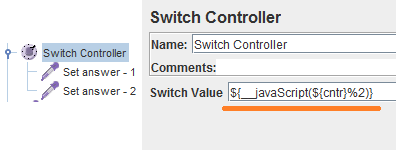
Example of Switch controller and javascript mod (%) operator
This approach actually means that each time the new thread gets started the sequential number is generated by the conter. That value is stored in cntr property. Then the execution flow gets into Switch Controller. It evaluates the number of the item to be executed this time. Evealuation is performed with the help of javascript mod operator. Thus in above example we have two alternatives to choose from so we must get the reminder after devision current thread number by two. If we have N alternatives to choose from we must specify the following   condition:

${__javaScript(${cntr}%N)}

That's it

Friday, January 06, 2012

Understand JMeter RMI properties

As you probably know JMeter allows to set up distributed cluster to distribute loading among several peaces of hardware resources. To make it available JMeter uses RMI (remote method invocation) technology. That means jmeter parses the scenario and sends the dedicated commands to the loading nodes (injectors) replicating the scenario among them.
RMI communication is built over the network. When JMeter master sends the command to injector it sends the command to invoke injector method to the certain port (RMI port) and awaits the execution results back to the own ports it is listening (local port). The local port is usually not a constant and may vary within certain bounds. It might cause the problems when you use firewall rules blocking the port which is chosen by jmeter as the local port. That's why jmeter gives you the capability of setting up such the port number explicitly.

So you will need to configure the following properties which can be found in /bin/jmeter.properties (do not forget to remove commenting character #). All this is correct for build 2.5.1 r1177103

server_port=1099
That means jmeter master will communicate with injectors using this port as default one

server.rmi.localport=4000
This port is used to get the response on the method that is executed from the server elsewhere.

client.rmi.localport=4000
This parameter is responsible for setting up the port the client (master node) will get the responses from the samplers been running on a server (slave aka injectors).

You may also find the parameter server.rmi.port but it actually does nothing (according to jmeter source code) and is overwritten with server_port parameter in case it is uncommented and has non-zero value when jmeter starts as the server.

The one important thing to know: always specify remote_hosts parameter (on the client side) with the servers in following notation: SERVER_NAME:SERVER_PORT where SERVER_PORT is the one set up with server_port parameter on the certain server (aka slave aka injector). The build I have used for this post (see above) had the defect (aka undocumented feature) in node looking up procedure in the registry.

That seems to be it.

Wednesday, December 21, 2011

Check your build procedure performance

Starting the work with legacy ant-based builders check the performance of the executed tasks and targets obligatory. The experience shows that there can be a lot of redundant operations there so removing them you can reach significant performance increasing. The best way to measure the ant build procedure performance is to use third-party listeners like this or to write your own.
Just introduce -listener fully.qualified.class.name option into your build.bat ant calling or specify it in your IDE execution context.

Monday, September 19, 2011

JMeter server does not send back the sampler results on Ubuntu linux

Trying to simulate distributed JMeter configuration over the virtual hosts network (virtualbox) I facedd the set of problems caused by the fact that JMeter does not correctly determine the ip address of the hosts it'r running at. For example I could not even connect to jmeter-server because it considered the local address as the localhost (127.0.0.1). Short investigation showed that the solution is placed inside the jmeter-server file. It says:

# If the client fails with:
# ERROR - jmeter.engine.ClientJMeterEngine: java.rmi.ConnectException: Connection refused to host: 127.0.0.1
# then it may be due to the server host returning 127.0.0.1 as its address

# One way to fix this is to define RMI_HOST_DEF below
#RMI_HOST_DEF=-Djava.rmi.server.hostname=xxx.xxx.xxx.xxx

${DIRNAME}/jmeter ${RMI_HOST_DEF} -Dserver_port=${SERVER_PORT:-1099} -s -j jmeter-server.log "$@"

So uncommenting the RMI_HOST_DEF parameter and specifying the correct address solved the problem. However there were another one. When I ran the scenario I observed the errors in jmeter-server log file. It said the server couln't send back the sampler results as it tried to send it to 127.0.0.1. I couldn't find any solution in jmeter forums so I just applied the same one from jmeter-server to jmeter client.

So one should just edit the jmeter client execution linux bash script so that the last two lines will look like this:
RMI_HOST_DEF=-Djava.rmi.server.hostname=xxx.xxx.xxx.xxx
java $ARGS $JVM_ARGS $RMI_HOST_DEF -jar `dirname $0`/ApacheJMeter.jar "$@"

Where xxx.xxx.xxx.xxx should keep the ip address you're running your jmeter client at.